
Setup
Click into the Apps Directory on the sidebar in Pylon, then click on the Slack integration to install the app. You must be a Slack admin to perform the installation.Multiple Workspaces
Pylon can track customer messages across multiple Slack workspaces! Just connect each workspace individually from the Apps Directory and enable Pylon in the relevant channels. For example, if you have a Slack Community, Pylon can track common user questions!Usage
Messages from Slack are automatically sent to Pylon’s Views and Internal Threads for tracking and response.
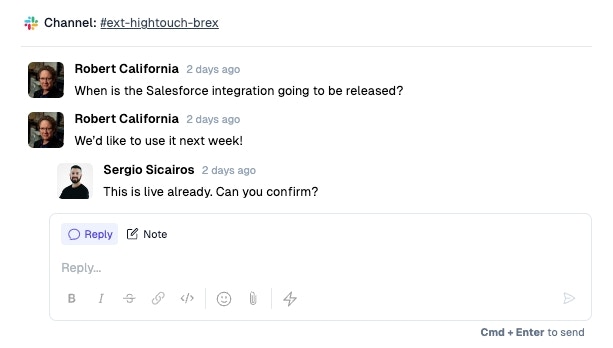
Customer Slack Channels
Pylon can track messages in public or private channels, as well as Slack Connect channels initiated by your customer.

Internal Collaboration
With Internal Threads, Pylon gives your team an internal place to collaborate on customer issues and take quick actions directly in Slack. This allows users without Pylon access to collaborate on issues without leaving Slack while still syncing the conversation across Slack and Pylon.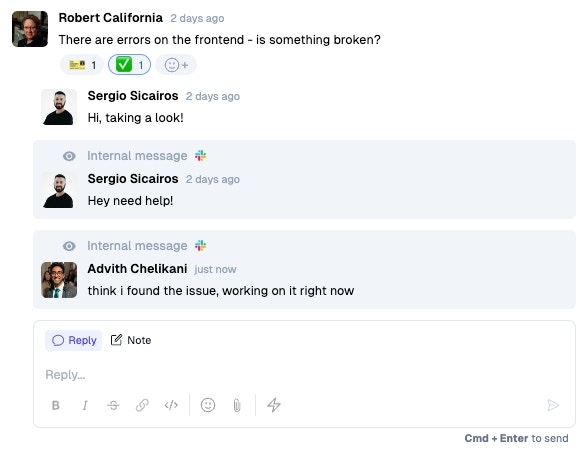
Workflows
Pylon has lots of customizations on how your team and customers can engage in support, onboarding, and other workflows through Slack. Examples include:- Customizing the in-Slack experience when a customer opens a ticket, like sending an automated message when a customer messages off hours
- Automatically setting bookmarks in Slack channels for quick links to documentation, tutorials, onboarding guides, etc.
- Collecting structured fields, like the priority of an issue, when a customer raises and issue from Slack
- Easily add new team members to subsets of your customer channels