
Setup
- Go to the Training Data page in Settings and click “Import Data”.
- Select a method of importing data and follow the instructions.
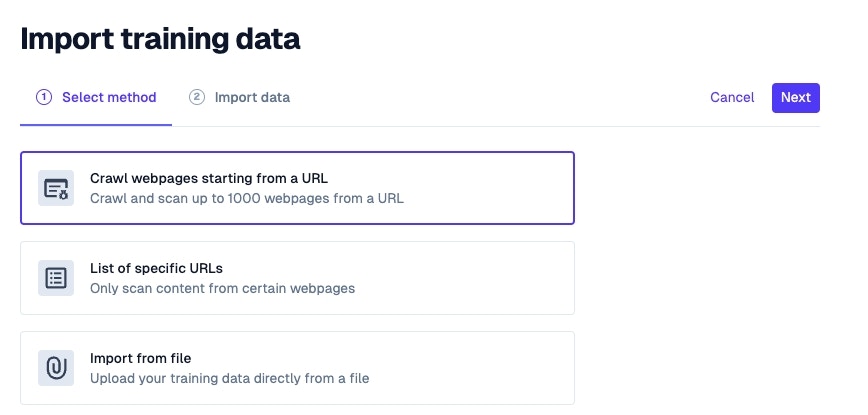
- Your Pylon knowledge base and past issues will be enabled by default and reindexed live
- Public URLs to individual webpages or a base url to crawl that will be reindexed every 7 or 30 days depending on your Pylon plan. Examples may include:
- Public-facing documentation not hosted by Pylon
- Public Google docs
- Public GitHub repos
- Your marketing website or pricing page
- Give Pylon a few moments to automatically scrape and index all your content
API Integration
For programmatic data ingestion, Pylon provides Training Data APIs that allow you to upload documents directly without publishing them to the public internet.
Upload Files
Endpoint:POST /training-data/upload
Upload files to a new or existing training data source via multipart form upload.
| Parameter | Required | Description |
|---|---|---|
training_data_id | No | ID of an existing data source to append to |
training_data_name | Yes (for new sources) | Name for the new training data source |
visibility | No | Access control: everyone, ai_agent_only, or user_only |
files | Yes | One or more files to upload |
Limits: Maximum 100MB per file, 500MB total per request.
Upload Text Content
Endpoint:POST /training-data/upload-content
Upload text content directly as a file to a new or existing training data source.
| Parameter | Required | Description |
|---|---|---|
training_data_id | No | ID of an existing data source to append to |
training_data_name | Yes (for new sources) | Name for the new training data source |
content | Yes | Text content to upload (max 100MB) |
file_name | Yes | Name for the uploaded file |
visibility | No | Access control setting |
external_id | No | For idempotent updates—matches existing documents |
Supports form-encoded, JSON, and Zapier POST requests.
Key Behaviors
- New sources: When no
training_data_idis provided, a new training data source is created - Appending: When an ID is supplied, content is appended to the existing source
- Idempotent updates: Use
external_idto update existing documents without creating duplicates